Deltaprints Blog
Design a Custom, Branded 3D Printable Planter in Minutes
There are thousands of planter STLs available online. But most have the same limitation: someone else already decided what the planter should look like.
The Deltaprints Custom Planter Designer takes a different approach.
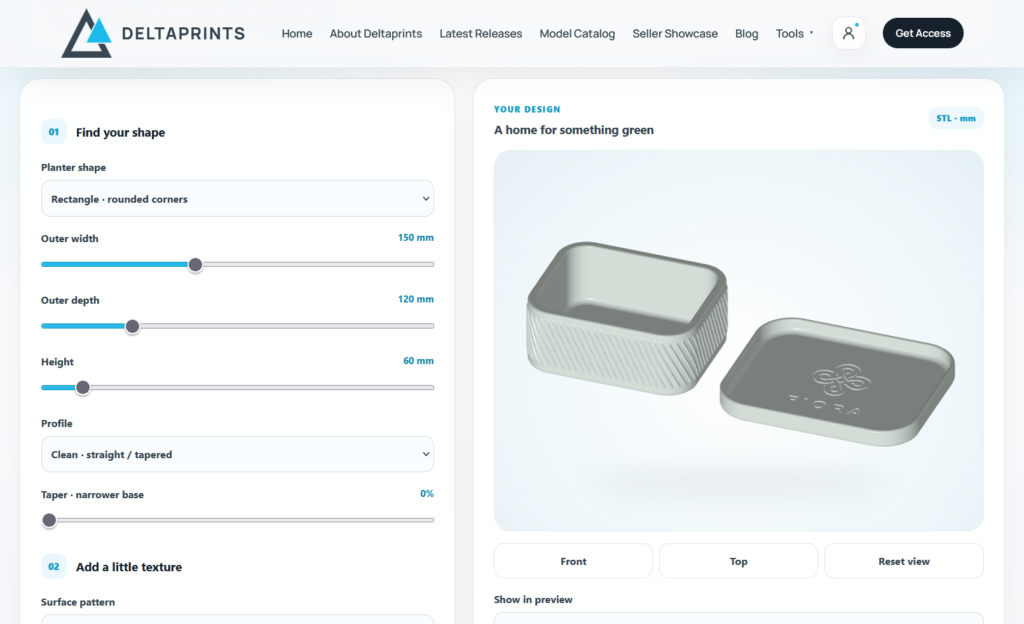
It lets you create your own planter directly in the browser, customize the geometry, upload your own logo, preview everything in 3D and generate a print-ready STL.
No CAD software. No manually editing meshes. And no rebuilding the same basic planter every time you need a new variation.
Start with the shape you actually need
The designer gives you control over the basic geometry of your planter, including its dimensions, height, profile and taper.
This isn’t simply uniform scaling of an existing STL. You can change the actual proportions of the design.
Want a wide, low planter for succulents? Make one.
Need a taller version in the same style? Change the height.
Want straighter walls or a stronger taper? Adjust it and immediately see the difference in the live preview.
Give it your own look
Dimensions are only part of the design.
You can choose different surface styles to give the planter more character and create variations around the same basic geometry.
And if you want to make the result genuinely yours, you can upload your own logo and integrate it directly into the planter.
For a 3D printing seller, this opens up some interesting possibilities.
Instead of selling a generic planter, you can create a recognizable product line carrying your own branding. Combine your logo with different shapes, sizes and surfaces, and the same designer can produce an entire collection.
Add drainage and a matching saucer
A planter should work as an actual planter, not just look good in a render.
Drainage can be configured directly in the designer, and you can create a matching saucer for the finished model.
That means you don’t have to generate a basic shape and then move into CAD just to add the practical details afterward.
See everything in 3D before you print
The live 3D preview is a big part of the workflow.
Change a dimension. Adjust the proportions. Try another surface. Add your logo.
You immediately get a much better idea of what the finished product will look like.
That makes experimentation fast. You can keep adjusting the design until everything feels right before committing to the final model.
From idea to print-ready STL—fast
This was one of the main goals when building the Planter Designer.
Creating a relatively simple branded product shouldn’t require a long CAD workflow every single time.
With the designer, the process can be as simple as:
Choose your shape → set the dimensions → select a surface → upload your logo → configure drainage → preview → generate STL.
That’s it.
Once you’re happy with the design, the resulting STL is ready to take into your slicer and prepare for printing.
For sellers who regularly create new product variations, that speed matters.
One tool, many products
This is where I think the Planter Designer becomes particularly useful for 3D printing businesses and Etsy sellers.
You’re not getting one STL. You’re getting a way to quickly create many variations.
A small desktop planter. A larger version. Different proportions. Different textures. A branded collection. Versions with or without saucers.
Instead of treating every variation as another modeling project, you can generate new designs from the same workflow.
And because you can add your own logo, the resulting prints can become part of your own product identity rather than looking like another generic downloaded model.
It makes the distance between “I have an idea for a new product” and “the STL is in my slicer” very short.
Watch me design one from scratch
In the video, I go through the complete process myself.
I start with a basic planter, adjust the shape and proportions, choose the surface details, configure the functional options, upload a logo, and use the 3D preview to dial everything in.
Then I generate the finished STL.
The designer is available for everyone to experiment with, so you can use the settings and live preview without an account. STL downloads are available to Deltaprints All Access Patrons.
Try the Planter Designer
Whether you’re making a planter for yourself or building a new product for your 3D printing shop, the goal is the same:
Spend less time modeling and get to the printable result faster.
👉 Open the Deltaprints Custom Planter Designer:
https://deltaprints.de/planter-designer/
Latest Releases